
 VoxAction
Instant, accurate dictation in any Windows app
VoxAction is the universal Windows voice input layer: hold a push-to-talk hotkey and your words appear directly at the caret—in email, docs, chats, CRMs, IDEs, even legacy tools. No dictation box. No copy/paste. Just speak naturally and keep working. Get 3–5× faster writing, fewer interruptions, and cleaner output thanks to context-aware transcription and a personal dictionary.
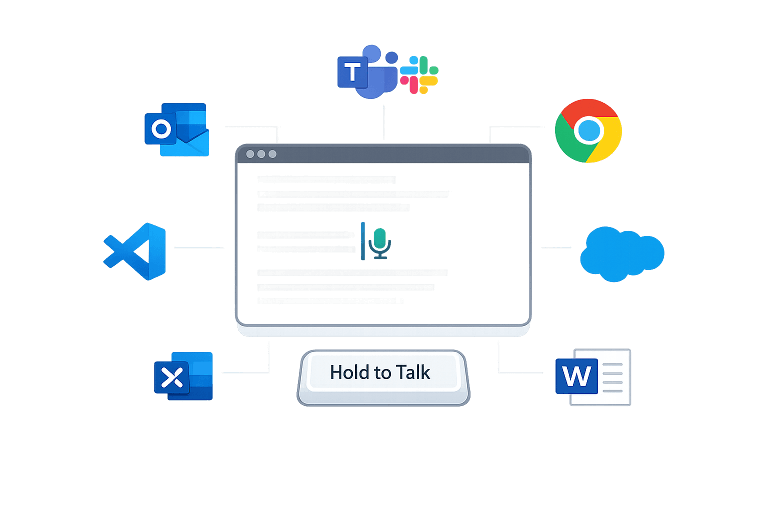
Works Everywhere
One hotkey, zero UI friction
If you can type there, VoxAction can write there. Press your hotkey, speak, and the text lands exactly where your cursor is—no floating widgets, no dedicated editor, no broken workflows. This matters because real work happens across dozens of apps and tiny input fields. VoxAction behaves like a native extension of your keyboard: always ready, always consistent, and fast enough to keep your train of thought intact.
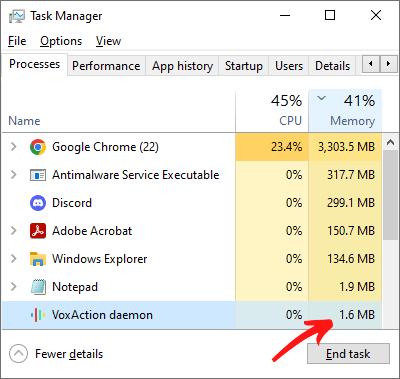
Instant & Lightweight
Under 10 MB, reacts in milliseconds
Most dictation apps feel heavy: slow to wake up, sluggish UI, and the classic failure—missing your first words. That’s not a small annoyance; it kills trust. VoxAction is native, ultra-optimized Windows code with a tiny footprint and near-instant reaction time, so you can push-to-talk mid-thought and not lose the opening. It’s built to run all day beside IDEs, browsers, VMs, and real workloads.
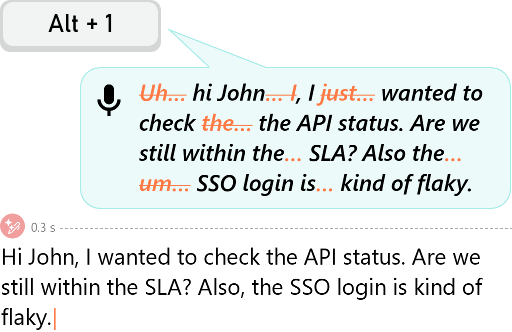
Robust Accuracy
Understands meaning, not just sounds
Traditional dictation breaks the moment you’re tired, you hesitate, or you don’t speak like a news anchor. VoxAction is built for real speech: no training required, strong semantic understanding, and automatic punctuation so you can talk naturally. It stays stable through pauses, hesitations, and even stutters, and it handles technical jargon and acronyms without constant “say it again” loops (especially with your personal dictionary). It also works in quieter situations—yes, even when you whisper.
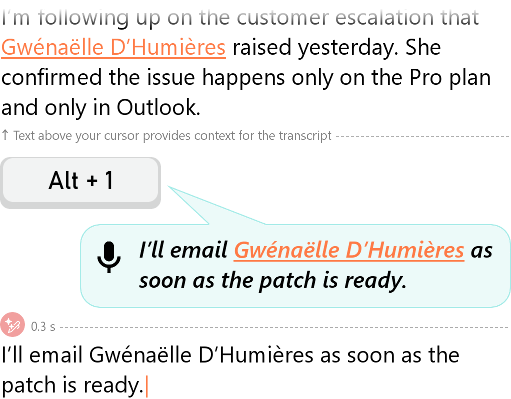
Uses Your Context
Reads nearby text to stay consistent
VoxAction can look at the text around your caret (for example, the lines just above) to keep dictation consistent with what you’re already writing. That means better disambiguation of similar-sounding terms, fewer mistakes with names and acronyms, and smarter formatting decisions when the surrounding content implies structure (lists, headings, code blocks, etc.). The advantage is practical: you spend less time fixing “almost right” output and more time staying in flow—especially in threaded conversations and ongoing documents.
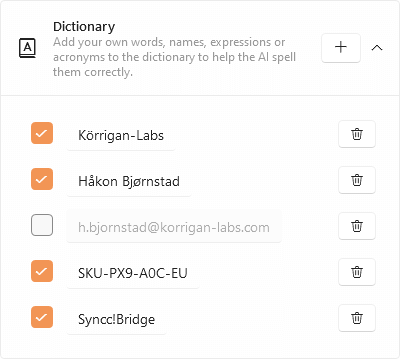
Your Dictionary
Names and jargon spelled right, always
The fastest way to abandon dictation is embarrassment: misspelled client names, wrong product SKUs, or mangled technical terms. VoxAction fixes that with a personal dictionary designed for real work—proper nouns, acronyms, industry jargon, even tricky identifiers. Add once, benefit forever. Combined with context awareness, it dramatically reduces “cleanup tax”, which is the hidden cost of voice tools. You stay confident using it for messages you actually care about sending.
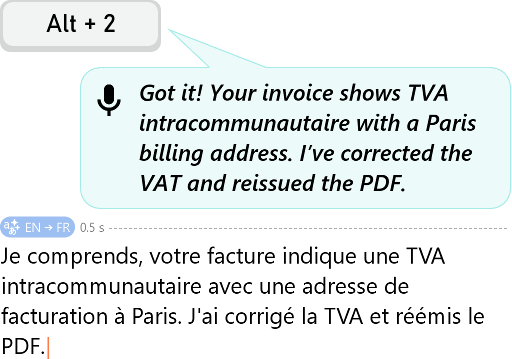
One-Step Translation
Speak one language, write another instantly
International work is full of friction: you think in one language, type in another, then copy/paste into translators and re-edit the tone. VoxAction removes the entire detour. Use a dedicated translation shortcut: dictate in language A, and VoxAction inserts polished text in language B—directly where you’re writing. It’s ideal for sales/support, global teams, and anyone who wants to communicate confidently without spending extra minutes per message on translation glue-work.
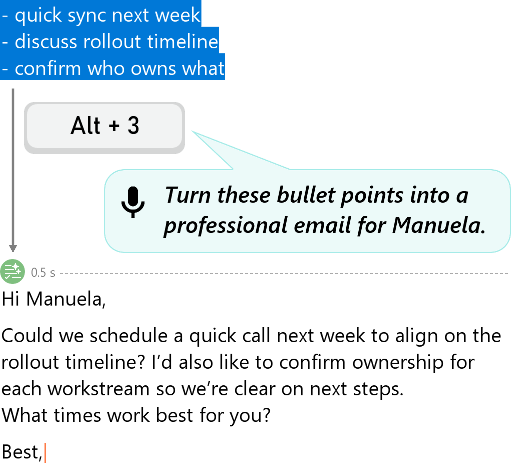
Voice → Action
Select text, speak the transformation
Before: you dictate, then you alt-tab into an AI tool, paste, prompt, copy, paste back, fix formatting.
After: you select text in any app and simply say what you want—rewrite, summarize, translate, simplify, refactor code, rename variables—then it updates in place.
The bridge is VoxAction: a universal “voice command layer” for text, not just speech-to-text. That’s how you turn dictation into a compounding productivity loop.
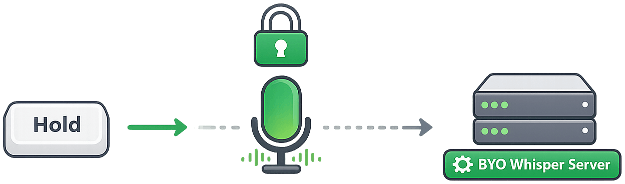
Privacy By Design
Push-to-talk control and BYO processing
Always-listening mics feel creepy—and they create real risk in meetings, healthcare, legal work, or simply shared offices. VoxAction uses push-to-talk: the mic is active only while you hold the key. On top of that, you can run in Free mode with your own Whisper-compatible API/server for maximum control, or use Pro for convenience and advanced AI features. You choose the privacy posture that matches your work, not the other way around.
Accessible Typing
Hands-free input for RSI and disabilities
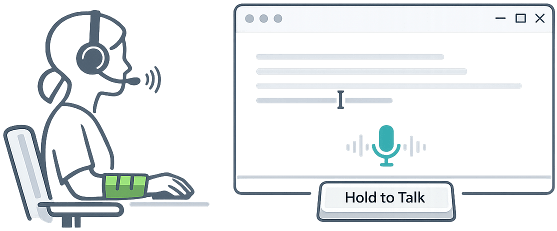
For many people, typing isn’t just slow—it’s painful or impossible. VoxAction is built to be a reliable daily driver for hands-free text entry: fast activation, minimal system load, and predictable behavior across apps. Push-to-talk also reduces anxiety about accidental capture, which matters for accessibility users as much as privacy-conscious professionals. Whether you’re managing RSI/carpal tunnel, arthritis, or motor limitations, VoxAction helps you keep independence and productivity without fighting your tools.
Excited yet?
Start free, upgrade for superpowers when ready
Start with VoxAction Free: bring your own Whisper-compatible API/server and get solid dictation with the same lightweight, universal workflow. Upgrade to Pro (from $5/month) to unlock one-step voice translation and voice-driven AI actions on selected text—rewrite, summarize, refactor, translate, and more. No bloated bundles, no enterprise theater: just a tiny Windows tool that earns its place on your machine every day.
FAQ
Do I need a subscription to use VoxAction?
VoxAction is designed around the $5/month subscription as the recommended path: it’s the simplest setup and unlocks the full experience (advanced AI features like actions + translation). If you prefer, you can also run VoxAction by connecting your own Whisper-compatible endpoint (BYO key). That can make VoxAction effectively free to use, but it requires additional configuration and depends on your provider.
What is “BYO key” mode, exactly?
BYO key mode means VoxAction sends audio to your Whisper-compatible provider/server using your credentials (often called a speech to text api key). VoxAction then inserts the resulting text at the caret like a keyboard. This path is best for power users who already have a provider, want maximum control, or want a “use VoxAction for free” setup.
If BYO key can be free, why would I pay?
Because the subscription is the smooth path and the complete product. BYO key is a bonus option: it can work great, but it adds setup steps and puts reliability, cost, and policy (retention/logging) in the hands of your chosen provider. Subscription is “it just works,” plus the advanced features you’re actually buying VoxAction for.
Which features require the subscription?
The subscription unlocks VoxAction’s advanced AI layer—especially voice commands that transform selected text (rewrite/summarize/refactor) and instant voice translation (speak one language, insert another). BYO key mode focuses on core dictation and depends on the backend you connect; the subscription path is the supported, recommended experience.
Can I start with subscription and later switch to BYO key (or the other way around)?
Yes. Many users start with the subscription (fast onboarding), then optionally add BYO key later if they want a custom backend or a “free usage” setup. Others do the reverse: they begin with BYO key to validate the workflow, then subscribe when they want the advanced features and the simplest day-to-day operation.
Is VoxAction an ai speech to text tool? Does it use Whisper?
VoxAction is a Windows voice to text for windows layer that can use Whisper-compatible backends. In BYO key mode, you connect your own provider/server. With the subscription, VoxAction uses its managed processing to deliver the full feature set with minimal configuration.
Is my data used to train AI? What about retention?
No—VoxAction is intended to be privacy-first: audio/text is processed to produce your output and is not used for training, with zero retention on the VoxAction side. In BYO key mode, your data policy depends on your provider/server configuration (logging/retention are under your control there).
Do you have a portable version (no installer)?
Yes. You can use the portable ZIP version here: https://www.nurgo-software.com/download/VoxAction.zip
Will it work in my app (Outlook/Teams/Chrome/Word/CRMs/IDEs/legacy tools)?
If the app accepts normal typing at the caret, VoxAction is designed to work—because it behaves like a keyboard-level voice typing application. Edge cases are usually corporate restrictions (blocked hotkeys/audio devices) or unusual remote environments, not VoxAction itself.
Can I run it with self hosting?
Yes. If you run a local Whisper-compatible endpoint (on your machine or your network), you can use VoxAction with self hosting. That’s typically a power-user route for maximum control, offline-ish workflows, or custom infrastructure—while the subscription remains the recommended “no-fuss” setup.